

Switching Print-on-Demand Providers: Step by Step Without Losing Sales
In short: Switching your print-on-demand provider usually takes two to three weeks, and you won't lose sales if you move step by step: order samples first, then switch a few bestsellers, then the rest. The old and new apps can run side by side for a while. What matters is that every product is assigned to exactly one provider at all times.
Good Reasons to Switch
- Delivery times are getting longer and reviews are getting worse.
- Quality varies because changing partner print shops do the printing.
- You're growing into new countries, but your provider doesn't produce there.
- Your margin no longer works, for example because of monthly fees or high shipping costs.
- You want to show up like a brand, with neck printing and your own premium blanks.
How to spot a good provider is covered in Print on Demand Providers: What to Look For.
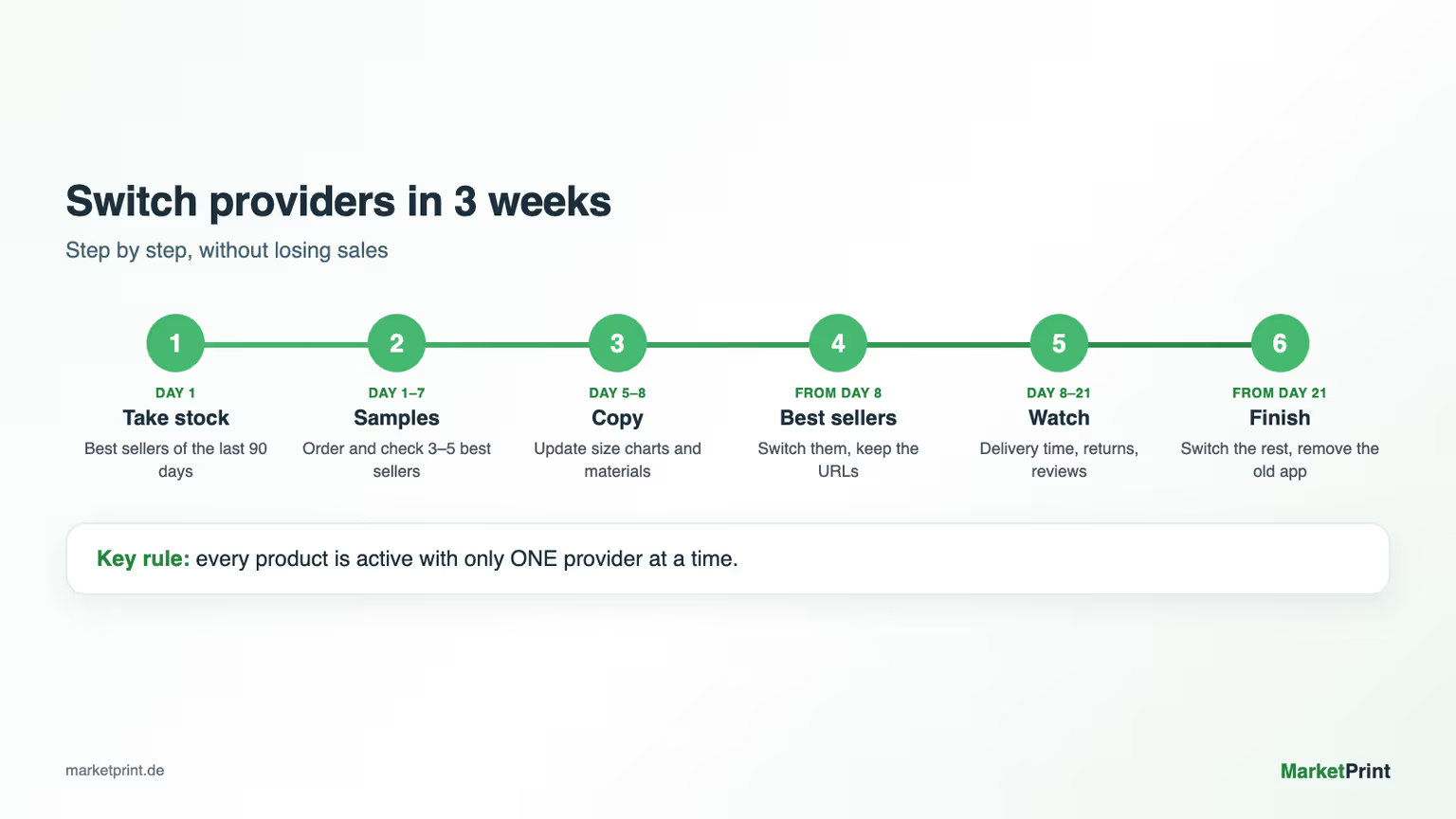
The Move in 6 Steps
Step 1: Take stock (day 1)
Make a list of all products with their sales over the last 90 days. Usually a few products bring in most of the revenue. Start with those.
Step 2: Order samples (days 1 to 7)
Install the new app, create your 3 to 5 bestsellers and order them for yourself. Check the print, color, size, fabric and packaging. Compare them directly with the old products.
Step 3: Update size charts and copy (days 5 to 8)
A new blank can fit differently. Update the size chart, material details and care instructions on the product page. Otherwise returns go up.
Step 4: Switch your bestsellers (from day 8)
Move your bestsellers to the new provider. Important: each product can only be active with one provider, otherwise an order gets printed twice. Running ads can keep going as long as the product URL and images stay the same.
Step 5: Watch for two weeks (days 8 to 21)
Keep an eye on delivery times, returns and reviews. If everything runs well, switch the rest of your products.
Step 6: Remove the old app (from day 21)
Once there are no open orders left with the old provider, uninstall the old app and cancel any subscriptions.
The 5 Most Common Mistakes When Switching
- Switching everything at once. Then one mistake hits your whole shop.
- Not ordering samples. You only see quality and fit once customers complain.
- Changing product URLs. You lose your Google rankings, and your ads point to nothing.
- Double assignment. A product that's active in both apps gets produced twice.
- Switching in the middle of peak season. Better not to change anything between Black Friday and Christmas. January and February are quieter.

Why Shops Switch to MarketPrint
| What matters to you | How it is at MarketPrint |
|---|---|
| In-house production | Own print shop in Mindelheim (more than 3,000 m², 4 Kornit machines) and own site in Houston, Texas |
| Speed | Target delivery time: 3 business days |
| Brand presence | Neck printing, own premium blanks |
| Exclusive products | Own premium blanks and the oversized VACANCY collection |
| Cost | Free to start, no minimum order, no monthly fee |
| Channels | Shopify, Etsy, WooCommerce, TikTok Shop |
| Rating | 4.8 out of 5 stars from 128 reviews in the Shopify App Store |
Big Store? We Help You Move
Do you have lots of products, several stores or many orders every day? Then you don't have to handle the move on your own. We personally help big stores switch to MarketPrint: moving your products over, planning the switch and handling your first sample orders.
Send us an email at service@marketprint.de with the subject "Switch", a link to your store and roughly how many orders you get per month. We'll get back to you with the next steps.
Checklist
- Bestsellers of the last 90 days listed
- Samples ordered and checked
- Size charts and material details updated
- Every product assigned to exactly one provider
- Product URLs unchanged
- Delivery times and reviews watched for two weeks
- Old app removed only after the last open order
FAQ
How long does it take to switch print-on-demand providers?
Plan for two to three weeks, including sample orders and the watch period. Switching a single product only takes minutes.
Will I lose my reviews when I switch?
No. Reviews belong to your shop and the product page, not to the provider. Keep your product URLs the same.
Can I use two print-on-demand apps at the same time?
Yes, as long as each product is only active in one app. That way you can move step by step.
When is the best time to switch?
Outside of peak season. January and February are ideal because there's time to test afterward.
Does MarketPrint help with the move?
Yes. We personally help big stores switch. Just email us at service@marketprint.de with a link to your store.
How do I get started with MarketPrint?
Install the MarketPrint app for Shopify, create your bestsellers and order samples. Getting started is free.